
Part 6 | Life of a Changelist
Arvid Burström, Technical Animation Director and Patrik Åkerberg, Tech lead Tools & CI
Installments
Building an Unreal game on CI involves the following:
Sync the Perforce repository to target_cl
Compile the Unreal Editor
Compile the Unreal Client or Server
Cook (preprocess game resources)
Stage (move binaries, put cooked resources into .pak files)
Compress and upload to cloud storage
If you worked with Unreal you might recognize the above as the steps run by BuildCookRun. Our actual CI processes run in a program called ci.exe that is about 80K lines of Rust code. It invokes Unreal tools, exports game data into our backends, publishes the game on Steam and Playstation and many other things. We have ~130 different pipelines currently. Each game has about 50 each for building different sets of clients with various degrees of optimization, running the presubmit for the game, and so on.
It’s not uncommon that CI is just a bunch of scripts, but it paid off well for us to have a tight language that helps the programmer a lot, and high unit test coverage. CI software like ours is actually pretty complex and the iteration times are high (game builds take time), so high correctness in ci.exe really helps keep the pipelines working.
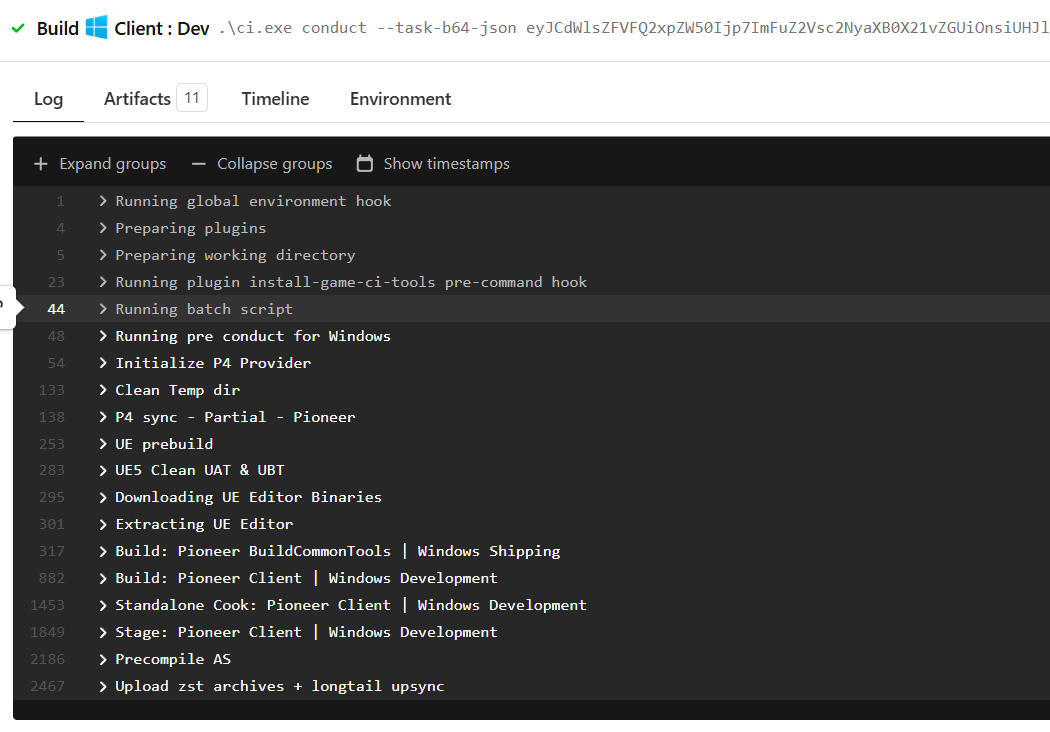
Building the ARC Raiders Windows client
There are different pipelines you can use; all of them compile the server as one job and then different kinds of clients depending on what you need. Each client or server takes up one build machine. The release build pipeline builds for all target platforms, which for us is Windows, PlayStation, Xbox, and WinGDK. We also build a Linux Unreal client for internal use.
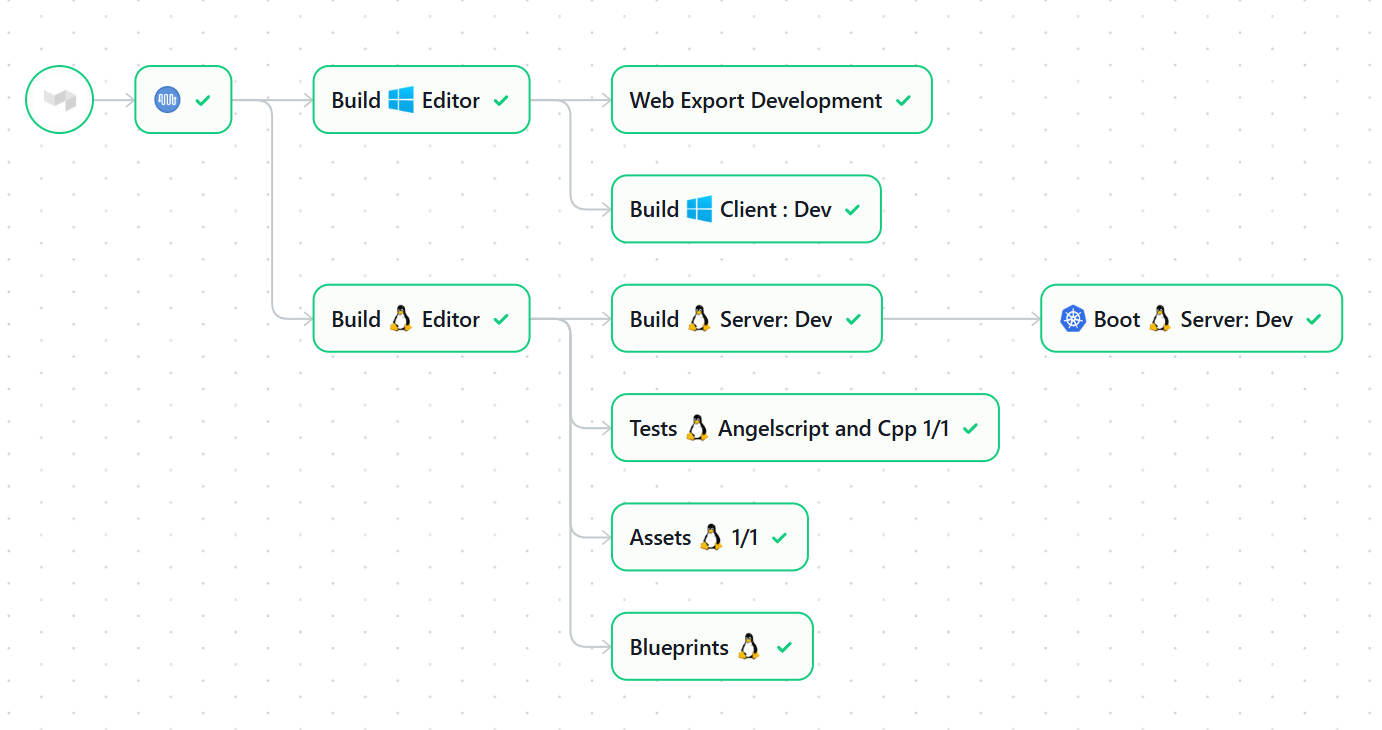
A standard tryjob (win PC client + linux server)
Life of a CL
With that brief introduction of how the game is built, we can start talking about the life of a CL (short for changelist, e.g. some change to game code or assets). The CI system wants to do two major things: churn out game builds and check that CLs are okay. The latter is called presubmit and usually means running some subset of the six steps we listed above.
So how does devs fix bugs? Let’s say it’s a gameplay bug. The developer starts working on the bug by reproducing it with PIE (“play in editor”). They can then iterate there until the bug is fixed. For more complicated problems (for instance with interactions between the client and server and/or backends) the dev can run a tryjob, which creates a proper game build on CI. The user can invite colleagues or play solo with debug commands.
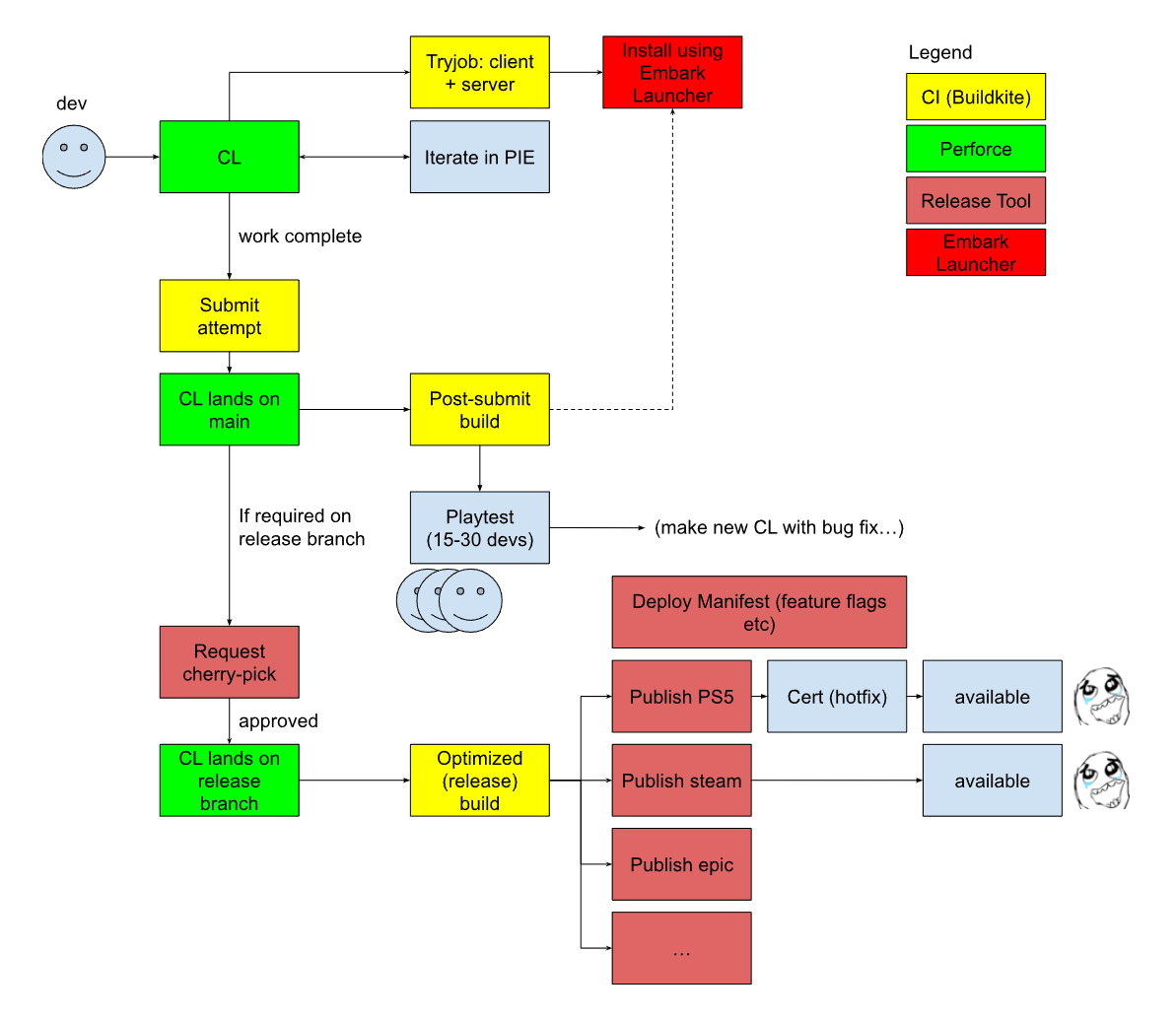
If we’re in a hurry the user can request a cherry pick right away, otherwise we normally want changes to be on main for a while so it’s covered by at least one playtest (regularly scheduled for each of our games). Playtests are a core process at Embark and everyone participates.
Now, let’s say we request a cherry pick because the bug is a critical one. This is done in the release tool, which is a pretty massive web-based tool. Its job is to allow the user to pick a build, configure it and deploy it. The CL lands on the release branch. The release manager can then trigger a release build. Any build going out to players needs to have all optimizations on, but we run them on extra beefy CI machines so we can churn an optimized ARC Raiders build out in maybe 90 minutes.
Once the build is complete, the release manager can start configuring the feature flags and other config for the game and create deployments to Steam, Playstation 5 Store and so on. The deployment pipeline to steam runs steamcmd.exe to upload the build for instance. This takes 20-40 minutes depending on platform, and for consoles you need to go through certification to varying degrees. Then after that, the build becomes available. So from submit to ship it takes a few hours!
Post-submit
The post-submit is a special pipeline where there are exactly 0 or 1 jobs running at any given time. It runs the following algorithm:
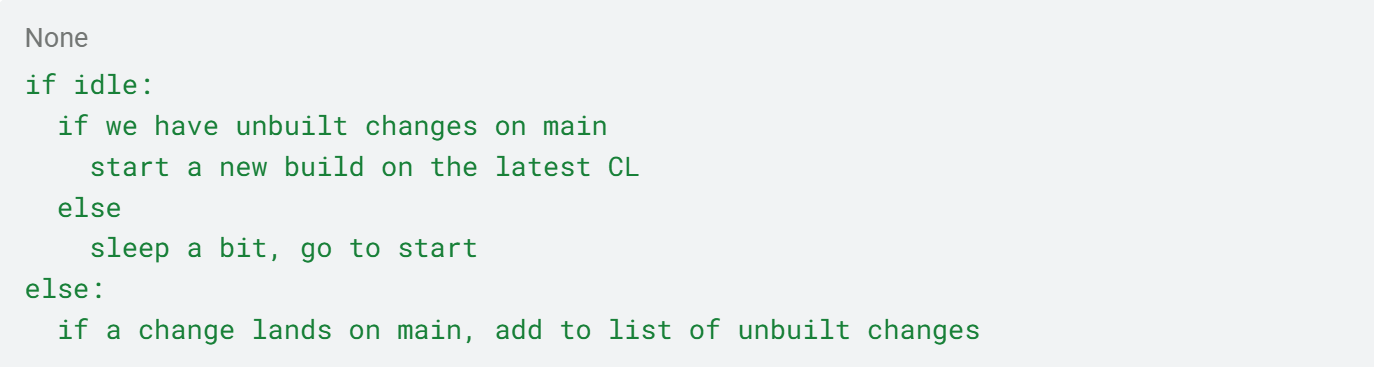
So you could say it batches changes together. The list of changes is gathered into a blamelist so that if the build breaks, it’s easy to see what changed. Each post-submit job has dedicated machines, so that we get a steady cadence of playable builds even if the rest of the build farm is overloaded.
The post-submit is there for a few reasons:
Produces dev builds at a reliable pace
Runs things that are too expensive to run in presubmit, like Xbox / PS5, building the game in Shipping and Test configurations
If two pre-submits work individually and not together they will both pass pre-submit, but break post-submit
Tryjobs
To develop games you need to prototype a lot. That’s why tryjobs are key. They allow you to make a full game build before actually landing your change. For most changes that are introduced to a game, you won’t know whether or not they work and feel right unless you actually try them in game, possibly with a few colleagues joining you. You kick off tryjobs using our custom tryjob tool.
By default it just builds your change as if it were on top of main, but you can also tweak a number of settings. This is useful for engine devs and our anti-cheat devs, or even for making special builds with dev assets when we’re producing game trailers.
Unreal provides robust ways to test your game in the editor. But we make multiplayer games with lots of backend interaction and social features. If the thing you’re testing turns out to work, you can land it on main and it becomes available to everyone else.
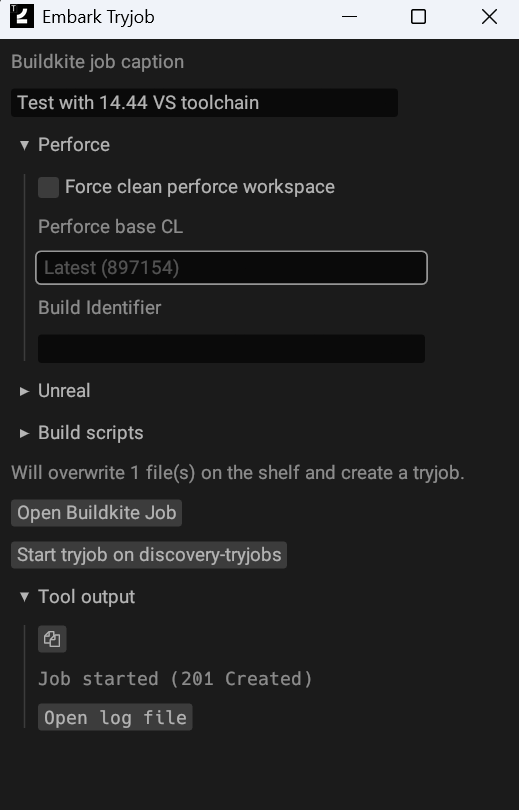
A full game build takes around an hour if you’re making an engine change. Content-only changes are a bit faster because they can just download binaries from somewhere else and don’t have to compile.
For game builds that just change code, we can run an even faster kind of tryjob called a patch tryjob which downloads some earlier build, replaces the game binaries or Angelscript and re-uploads it as a new build. They can also find and patch the .ini files inside the .pak files since this change is very common; finding and patching other assets is not supported, however. These tryjobs take more like 15-20 minutes and really allow our developers to iterate quickly.
Submit Attempts
A submit attempt (presubmit) is a CI job that runs on a pending changelist. If the job passes, the CL lands on main. This is how one submit attempt looks like for THE FINALS:
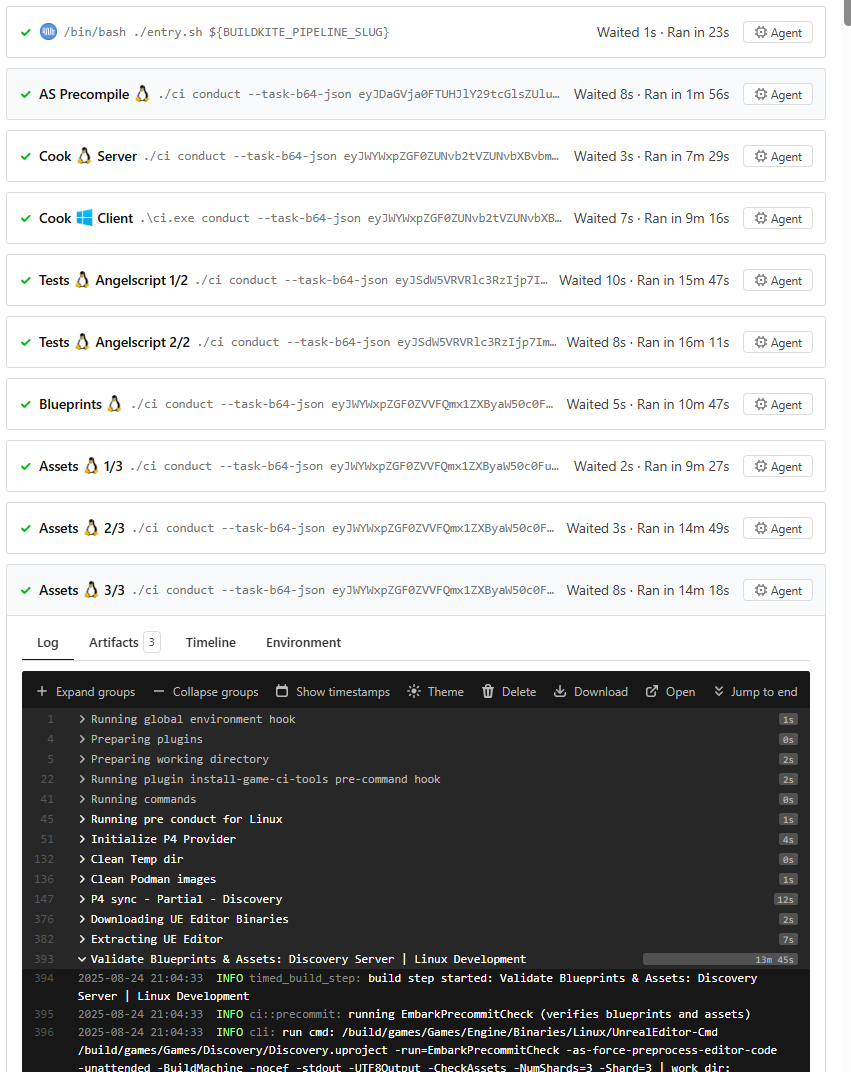
Submit attempt on THE FINALS (wall clock time: ~16 minutes)
Submit attempts have to be fast, but games have some characteristics that make this challenging:
The game engine is big -> lots of code to compile
There’s a lot of game content (hundreds of gigabytes)
We make live service games, so the amount of game content grows linearly over time
We used to run the presubmit like we do game builds: compile, cook, stage, upload. But we’re just checking the user’s changes, so we can skip the upload. Then we stripped the stage step because it’s pretty hard to break, that’s fine to leave for postsubmit to catch.
Then we found that game-only changes are 10x more common than engine changes. Why compile the engine if it didn’t change? So we built a CI architecture which sends binaries between build machines.
If you start doing that, you can start parallelizing submit attempts, which is really what you see above. This allows us to get down to 15 minutes wall-clock time for running thousands of tests and asset validators and cook for a pretty big game.
If the developer changes the engine, we also have to compile the editor, client and server and run all tests and validators for both games. We have a custom submit tool which looks at your CL and determines what kind of presubmit it needs to run.
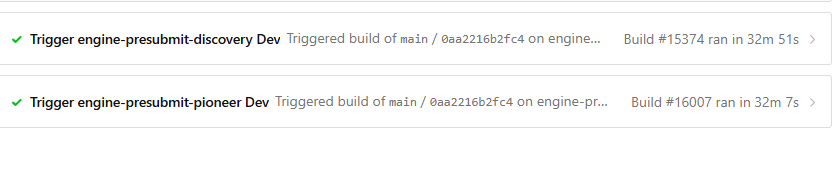
Tradeoffs in Submit Attempts
Submit attempts really have to be fast. They quickly lose their legitimacy with developers if they’re slow and even more so if they’re flaky. Developers will start hedging because re-running the attempt is so painful, which leads to lower quality and more defensive code. We aim for 20 minutes for game changes and 50 minutes for engine changes. It’s really fine if some issues slip through and break post-submit, as long as it's green most of the time (say 95%).
