
Part 7 | CI Performance and Optimization
Arvid Burström, Technical Animation Director and Patrik Åkerberg, Tech lead Tools & CI
Installments
Part 7: CI performance and optimization
“Why is my build so slow”?
No matter how good your CI is you always want it to be faster. The first step of making anything faster is to measure how fast it is. If you look too much at individual runs you’re going to end up exhausting yourself, drawing the wrong conclusions and also probably focusing too much on outliers rather than the main paths.
We came up with the TimedBuildStep struct in our CI code to measure a particular build step:
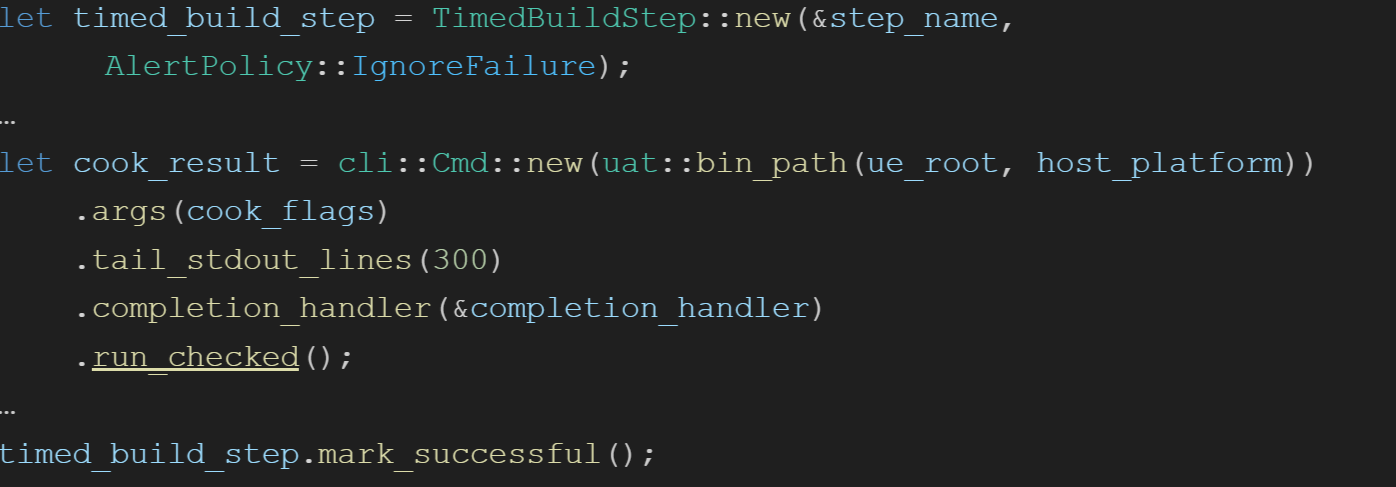
The timing information is uploaded to Grafana when the job completes. This image for instance shows how the cook build step improved when we turned on Multiprocess Cook (new feature in Unreal 5.3):
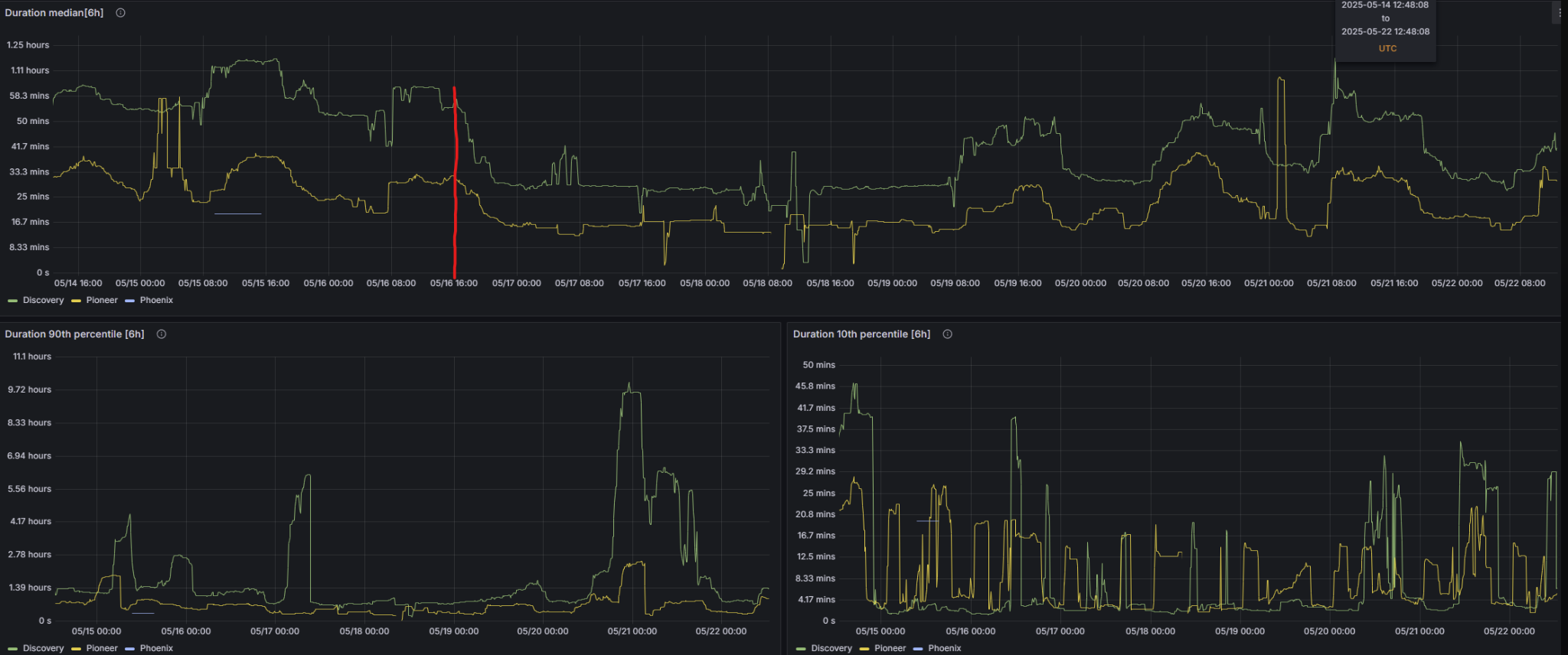
2x faster median cook times, nice!
Game builds involve many steps that are difficult to predict, so if you look at the execution time for the entire build the data will be noisy:
For instance, the compile time will depend on what the involved machines did before this job. If it was your senior engine developer changing CoreMinimal.h in Unreal, you will get a full rebuild even if you just changed something minor. If it was just your level designer moving a tree, the recompile is a no-op. So both the machine state and your change affect the compile time.
If a developer changes a shader material function for a master material, the cook will take 3-9 hours instead of the normal 45 minutes. The DDC will fill from this so later jobs will be faster.
This is why it’s key to have detailed data on each build step (compile, cook, stage etc), and over time like we have above. You could plot the average for all steps, but since they are so noisy it’s better to plot the median, 10th percentile (the 10% fastest builds) and 90th percentile (10% slowest builds). We have data 30 days back which is usually enough to analyze if a particular change made things better.
We have used this to evaluate changes, like enabling multiprocess Cook, and to catch regressions. For instance, we caught a sneaky build time regression with Clang linking that came with upgrading the Visual Studio toolchain from 17.12 to 17.14.
Improving speed with CI parallelization
The main key performance indicator (KPI) for CI builds is wall clock time. This is the time the developer has to wait until their submit attempt finishes, or the time until their game build is ready so they can test.
The most common way to make CI wall-clock time faster is parallelization. Let’s assume we have n tests to run for some particular code change and an infinite amount of machines. We have a code change C to verify.
If we assume we have something like THE FINALS game logic tests, which is 2522 tests that take 20 minutes to run in total. Let’s further say that the slowest test in 1..n takes T=60s to run and that the median compile time is 2 minutes and 90th percentile is 40 minutes. I will compare some approaches with some statistical hand waving to illustrate the point:
Unparallelized
Machine 1: apply C, compile, run test 1-n
Median wall-clock time: median compile + run tests = 2 + 20 = 22 minutes
Naive Parallelization
Machine 1: apply C, compile, run test 1
…
Machine n: apply C, compile, run test n
This has a good best case time: the entire run is no slower than the slowest test + compile. If it’s a small change C that takes 20 seconds to compile and we have T=60s from before, the run finishes in 80 seconds. That’s 15x better! The problem is just, like we noted above, that compile times depend on what the machine did before, and we’re now using 2522 machines, so the likelihood of hitting a full recompile approaches 100%. A full rebuild takes 40-60 minutes. So:
Median wall-clock time: full rebuild + (negligible time to run test) = 40-60 minutes
Compile-once Parallelization
Machine 1: apply C, compile, copy to file share
Machine 2: download binary from file share, run test 1
…
Machine n+1: download binary from file share, run test n
In our case we’re compiling, uploading and downloading the Unreal editor binaries, which work out to maybe 900MB of data. It’s not free to compress, upload, download on another machine and decompress, but if you compare with compile it’s very cheap and almost zero variance in comparison. We have a file share right next to the physical build machines in the data center, so it’s efficient and cheap to copy files between build machines.
Median wall clock time: median compile + upload/download + slowest test = 2+1+1 = 4 minutes
Conclusion about Parallelization
Even if compile-once parallelization is very fast, obviously the example is unrealistic because we don’t have n=2522 machines on hand. In practice we have to shard tests into batches. This can be as simple as enumerating as assigning each machine a shard index and a shard count.
For instance, say we have count=2. Machine 1 gets index 1, so it runs tests 1,3,5,... while machine 2 gets index 2, so it runs 2,4,6,... You may have to tweak how tests are enumerated so the slowest tests are spread evenly over the shards.
Further we assumed the only KPI is wall-clock time, which isn’t true. We also have to care about machine time (total machine minutes used by all machines involved in the job). At Embark we happily trade machine time for wall-clock time almost always, but there are limits.
Compile-once parallelization uses more machine time than the unparallelized solution because we add overhead to upload and download the binaries. Plus, UnrealEditor-Cmd.exe takes at least 30 seconds to start before it can even start running a test, so running just one would be very inefficient. Sharding is the way to manage this tradeoff.
For instance, we refactored our presubmit pipeline for engine changes from:_

To:
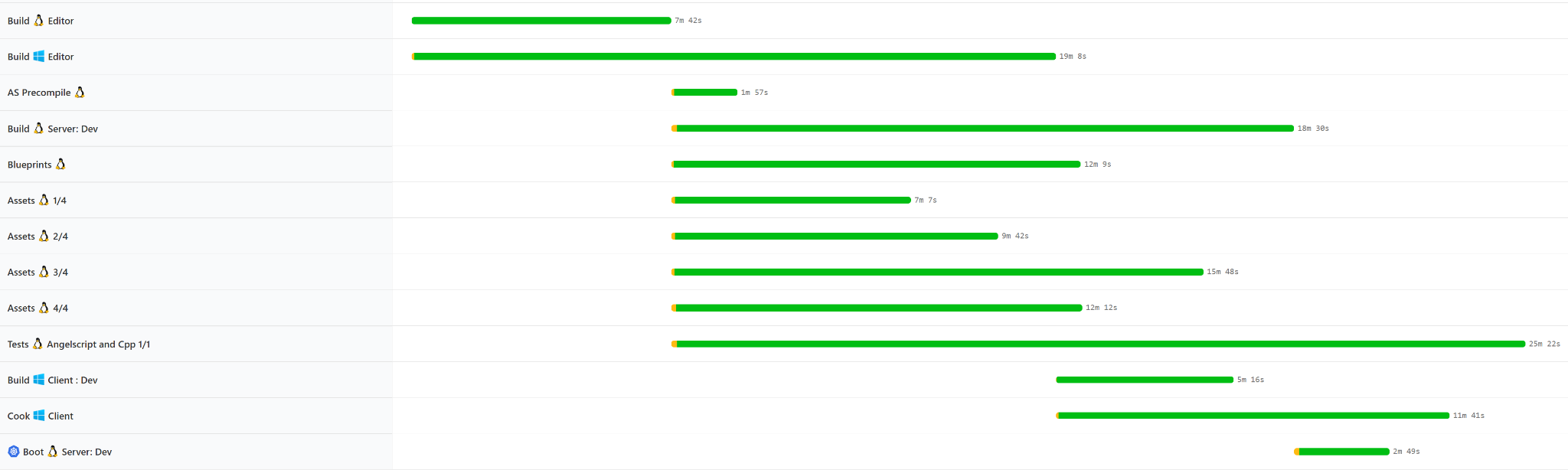
And the median wall-clock time dropped from about 90 minutes to 55 minutes.
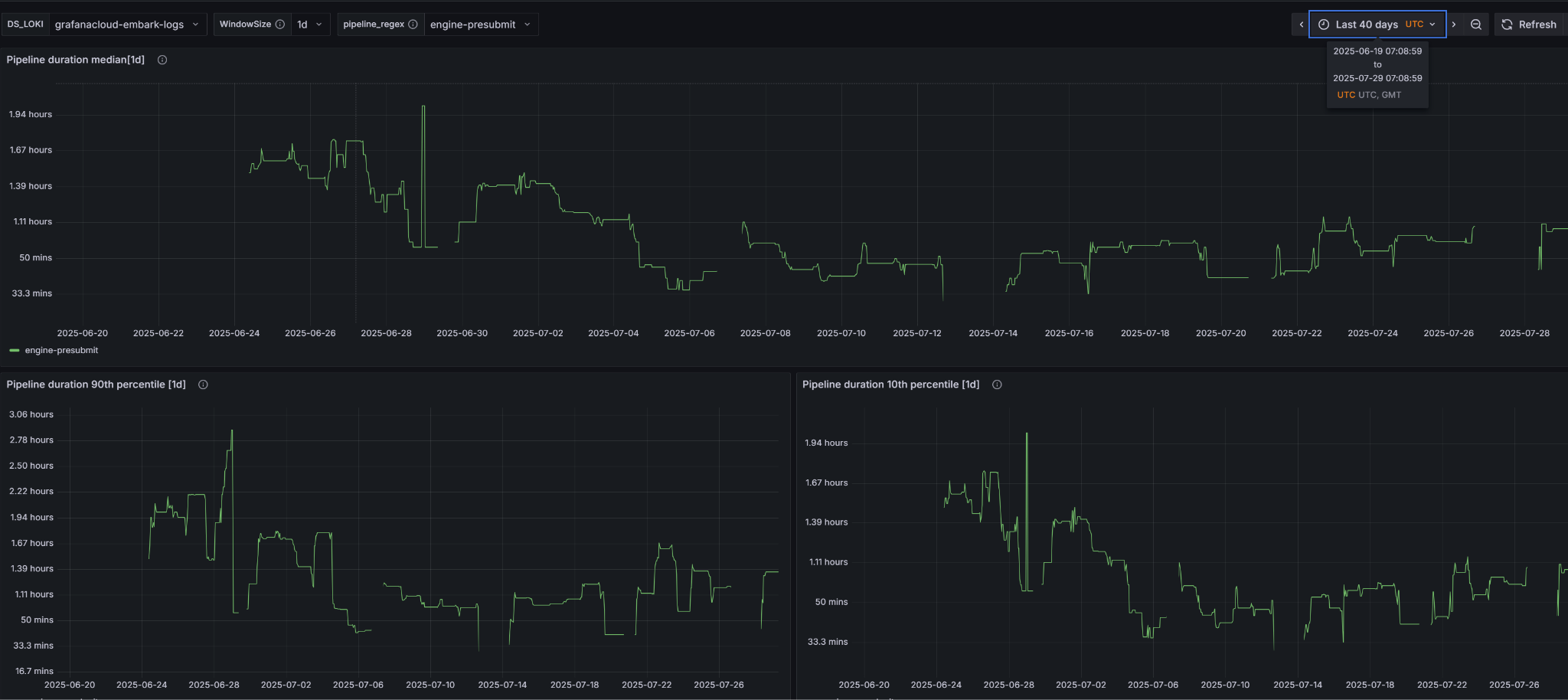
Also it’s likely more efficient in machine time since we’re spending less electricity compiling and more doing useful work.
Downloading and Uploading Binaries
Almost all of our pipelines are of the form “compile win + linux editor, then do everything else”. Like this:
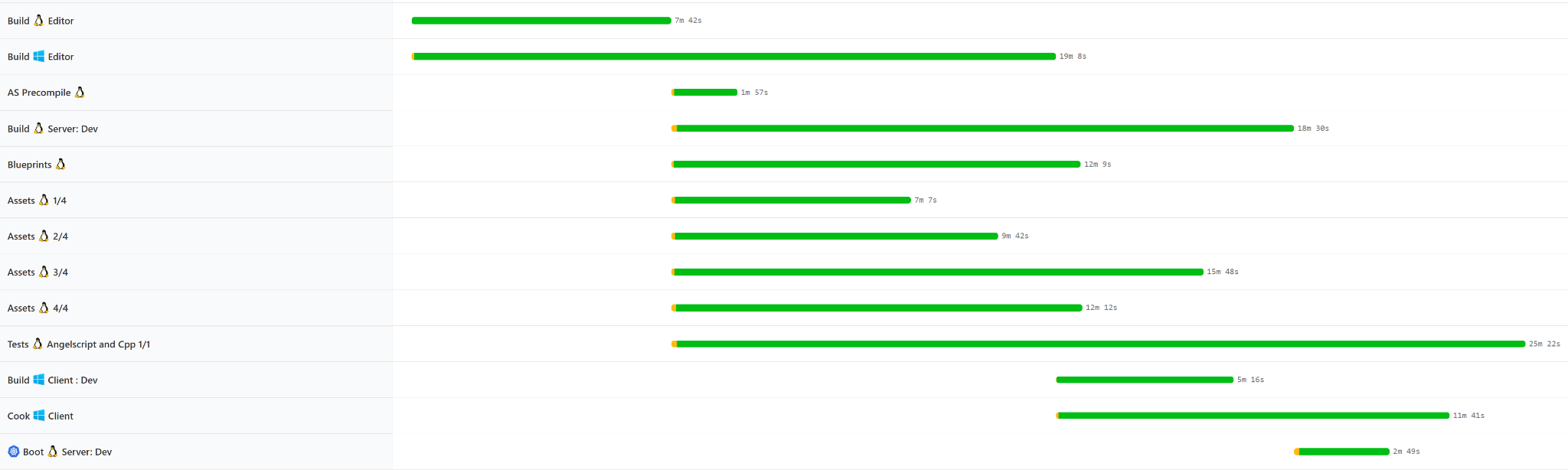
Unreal supports submitting editor binaries right into Perforce. UnrealGameSync (UGS) syncs them from Perforce when you check “sync precompiled binaries”. It writes the editor binaries into your checkout and then keeps a list of what it wrote. In CI, we also compile & store client binaries in the fileshare, which means we don’t need to compile the game client for every tryjob - only for the ones that actually change the engine.
Example of a Trade-off: Symbols
Unreal has custom logic for reading symbols and symbolicating stack traces in the log. This requires symbols to be in place next to the binaries, which is the case when you build normally. We are copying binaries between machines however, so we don’t get symbols unless we copy them ourselves. We chose not to do this because the symbols can easily be a factor 10 larger than the binaries, and it adds probably 60-90 seconds cycle time to each job. This is a big deal if your jobs take 10 minutes or less like in our case; not worth it for crashes that happen very rarely.
But stack traces are very nice for debugging, so can we find a compromise? We did this:
At the end of major build step, check if there are any recent core dumps
If there are, download symbols
Invoke coredumpctl to symbolicate the core dump
Upload to buildkite and parse out the crash info, registers and crashing thread so we can put that front and center in the buildkite annotations
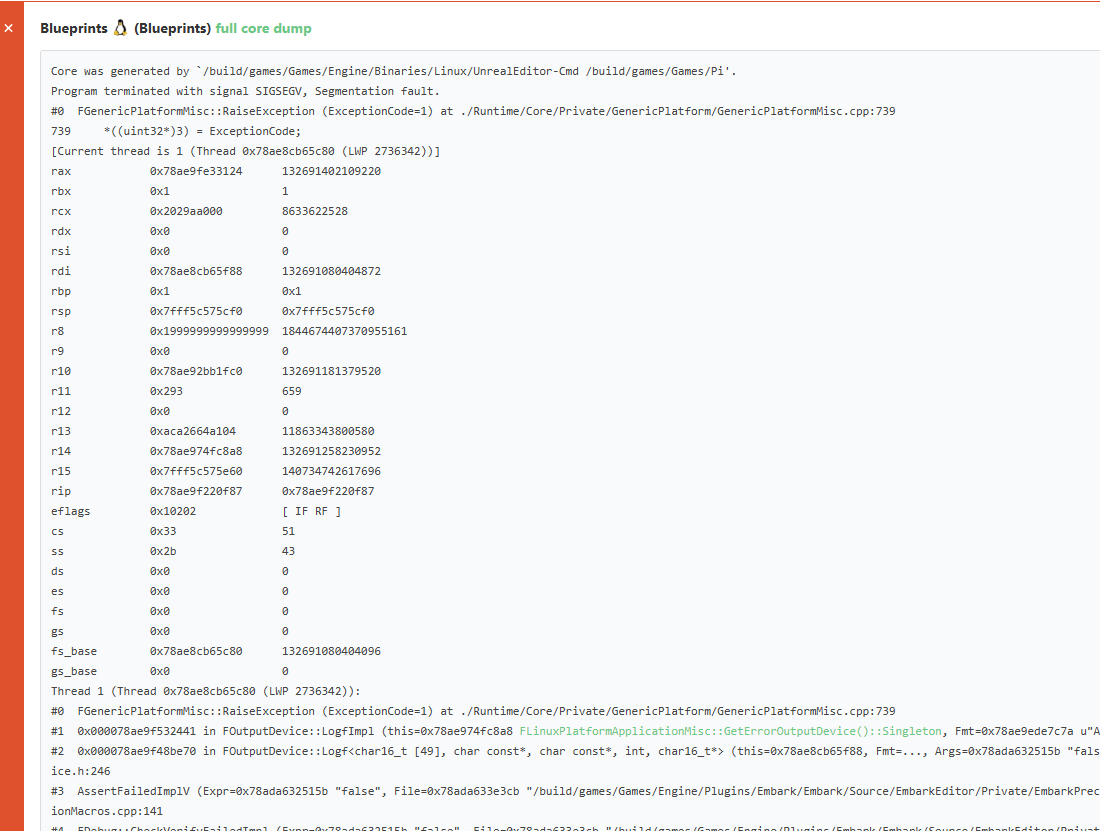
Core dump annotation in Buildkite
This obviously only works on Linux, but that’s fine. If platform doesn’t matter, like when running tests/asset validators/compiling blueprints, we use Linux anyway because they’re easier to manage. We also don’t symbolicate e.g. ensures which do not generate core dumps. So we have to accept some downsides but jobs run much faster!
Conclusion
The main takeaways from this article are:
Measure thoroughly to see the true impact of your changes
Reduce wall-clock time with parallelization
Nothing in Unreal 5.3 prevents you from copying editor binaries around
The main tradeoff is how much to parallelize; depends on the overhead per job vs. how much wall-clock time you can gain
